New · Image Recognition

One photo. A full product listing.

Turning the product content you have into the content you need.

Pelican now looks at your product photography, not just your product titles. Colour, material, fit, styling, who's wearing it and how, read straight from the image, then written into the fields your storefront and the AI agents actually read.

  • Descriptions written from what's in the photo, not guessed from the title
  • Alt text that describes the actual image
  • Metafield suggestions: brand tagline, model description and more
  • Opt-in, per shop. Nothing is analysed until you switch it on
✦
Product PelicanShopify admin · product content

Classic Blue Unisex Cotton Crew Neck T-shirt

Classic blue unisex cotton crew neck t-shirt
Scanning images

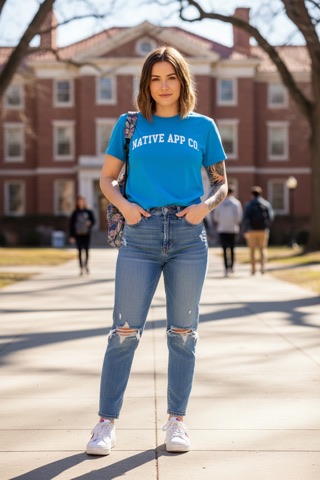
Step up your casual game with this vibrant blue crew neck tee that brings a pop of colour to your everyday rotation. The bold white “NATIVE APP CO.” lettering adds a collegiate vibe that looks great tucked into high-waisted jeans or worn loose.

Made from soft, breathable cotton, this unisex staple is designed for all-day comfort, and free shipping kicks in over $150.

* Vibrant classic blue colourway that stands out against denim.

* Soft cotton fabric for breathable, everyday comfort.

Metafield suggestions

A campus classic: soft cotton, honest colour, fits everyone.

A woman with shoulder-length brown hair stands on a concrete path, wearing the blue “NATIVE APP CO.” tee tucked into ripped jeans and white sneakers.

Product content updated
Now try Product Pelican on your own store. Install Now

Generate rich product content directly from your images and existing content.

↑ Product content, populated from what you already have

Most catalogues have better photography than copy. The picture already shows the colour, the cut, the material and the styling. The description just never said so.

What it reads

Colour and colourway, material and texture, cut and fit, styling cues, what the model is wearing and where, packaging, format, on-pack text. Whatever is genuinely visible in the shot.

What it writes

The product description, image alt text, and metafield values like brand tagline and model description. Each one arrives as a suggestion with its own tick box, so you can take the metafields and leave the description, or the other way round.

What it never does

Change anything you haven't approved. Image recognition is off until you turn it on, and every suggestion needs an explicit Apply. No silent overwrites of copy you've already written.

Why it matters

Indexed is not the same as recommended.

When a shopper asks an AI assistant for “a soft blue cotton tee that isn't see-through”, the assistant answers from product data, not from your photography. A beautiful image with a two-line description is invisible to the thing now doing the recommending. Image recognition closes that gap by turning what you can see into something a machine can read.

★★★★★

Awesome app and saved me so much time updating alt tags and other product attributes. Highly recommend!
Vittoria Coffee

★★★★★

Product Pelican has made navigating the confusing, overwhelming buzzword-filled world of GEO incredibly simple.
SafeStyle Eyewear

★★★★★

Product Pelican found a lot of improvements on my product pages and all that new category data is stored natively in Shopify.
viaGlamour Cosmetics
01 · How it works

From photo to published, in five.

Nothing leaves Shopify. Nothing changes without your say-so.

STEP 01

Switch it on

Tick Use product images in AI generation on the AI Prompts page, and choose how many images per product Pelican should look at.

AI Prompts → Description

STEP 02

Pick your products

One product, a filtered selection, or the whole catalogue. Image recognition rides along with the description and alt text generation you already run.

STEP 03

Pelican looks

Your product images are read as images, the same photos already on your CDN. No uploads, no re-hosting, no separate media library to maintain.

STEP 04

Review the suggestions

Description, alt text and metafield values come back as drafts. Edit in place, tick what you want, and open Show thinking if you want to see the reasoning behind a suggestion.

STEP 05

Apply

Approved content is written into Shopify as native product fields and metafields. It's your store's own data, with nothing to rip out later.

Workflow · Descriptions

Descriptions that mention what you can actually see.

A title-only model writes generic copy because it only has a generic input. Give it the photo and the same model starts naming the colourway, the fit, the fabric weight and the way the piece is styled.

Set how many images per product it should read. One is usually enough, up to five for products where the detail shots carry the information.


Bulk alt text generation with AI suggestions in Product Pelican
Workflow · Alt text

Alt text that has seen the image.

Alt text guessed from a product title is a compliance tick box. Alt text generated from the image is a genuine description of what's in the picture: better for screen readers, better for image search, better for the crawlers building a picture of your catalogue.

Generate in bulk, edit in place, save when you're happy.

Workflow · Metafields

Metafields, filled from the photograph.

The same image read for the description also feeds metafield population: brand tagline, model description, and the category metafields Shopify's taxonomy expects.

Each field has its own tick box and its own reasoning transcript, and Pelican tells you which fields it couldn't fill rather than inventing a value.

Screenshot neededMetafield suggestion rows
02 · The rest of the toolkit

What Pelican does with the rest of your catalogue.

Published pages appear here automatically.

03 · Image recognition FAQs

The obvious questions.

Does this turn on by itself?

No. Image recognition is opt-in per shop and off by default. Tick Use product images in AI generation on the AI Prompts page. No image is analysed, and nothing is billed against your image allowance, until you switch it on.

How many of my product images does it look at?

You choose, from one to five per product. One is the default and is usually enough; raise it for products where the detail or lifestyle shots carry information the hero image doesn't.

Will it overwrite descriptions I've already written?

Only if you tell it to. Everything comes back as a suggestion you can edit, tick or discard, and the description has its own tick box separate from the metafields, so you can accept the metafield values without touching copy you're happy with.

Can I see why it wrote what it wrote?

Yes. Every generated description and metafield has a Show thinking link that opens the model's reasoning for that specific suggestion. If a generation fails, the transcript explains why.

What happens when I hit my monthly image allowance?

Generation carries on. It just falls back to text-only for the rest of the month and tells you it's done so. It never blocks you mid-run. Your current usage and limit are both shown in the app.

Does it work with lifestyle photography, or only packshots?

Both. Lifestyle shots are often the more useful input, because they carry the styling and fit cues a packshot doesn't. That's where the model description metafield comes from.

Can it read the text in a photo, like a label?

Yes. If you actually want it to read labels off bottles, it will do that as well, which is insane. Martin Cox, co-founder

Your photography is already doing the work.

Let it write the listing too. Native to Shopify, and nothing changes until you approve it.

Install Product Pelican →